Agenda
前言:
上一篇我們介紹HttpModule & HttpHandler對於
今天正式進入.Net CLR處理Http請求的世界.
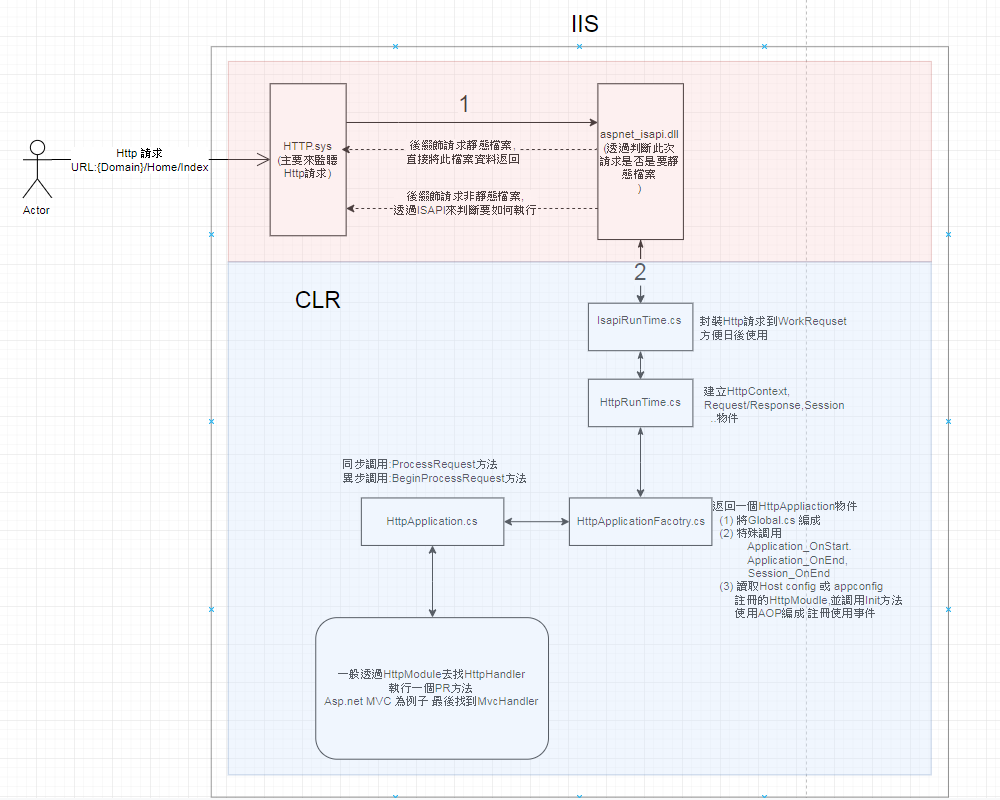
先附上Asp.net執行請求流程圖.
![瀏覽器請求IIS流程]()
現在開始講解藍色區塊.
查看原始碼好站 Reference Source
IIS 與 Asp net (W3SVC服務)
World Wide Web Publishing Service(簡稱W3SVC)是一個Window Service.
W3SVC在SvcHost.exe這個應用程式上被執行.
W3SVC主要功能
- HTTP請求的監聽
- 工作執行緒的管理以及配置管理
當檢測到某個HTTP Request後,先根據一個註冊表判斷請求的副檔名是否是靜態資源(比如.html,.img,.txt,.xml…)
如果是則直接將文件內容以HTTP Response的形式返回。
如果是動態資源(比如.aspx,asp,php等等),則通過副檔名從IIS的Script Map找到相應ISAPI.dll
IISAPIRuntime介面
前面說到透過W3SVC服務
System.Web.Hosting.IISAPIRuntime這個介面是一個基於COM的Interface,
ASP.NET ISAPI可以通過COM的方式調用實現該Interface的Class物件的ProcessRequest方法,從非託管環境進入了託管的環境。
1
2
3
4
5
6
7
8
9
10
11
12
13
14
15
16
| [ComImport, Guid("08a2c56f-7c16-41c1-a8be-432917a1a2d1"), InterfaceTypeAttribute(ComInterfaceType.InterfaceIsIUnknown)]
public interface IISAPIRuntime {
void StartProcessing();
void StopProcessing();
[return: MarshalAs(UnmanagedType.I4)]
int ProcessRequest(
[In]
IntPtr ecb,
[In, MarshalAs(UnmanagedType.I4)]
int useProcessModel);
void DoGCCollect();
}
|
所以IISAPIRuntime.ProcessRequest是我們探討原始碼起始點.
IsapiRunTime.ProcessRequest
一開始會先呼叫IsapiRunTime的ProcessRequest方法來執行此次請求.
在CreateWorkerRequest會依據不同IIS版本建立不同ISAPIWorkerRequest物件,之後在呼叫Initialize方法把Http請求內容初次填入這個對象.
1
2
3
4
5
6
7
8
9
10
11
12
13
14
15
16
17
18
19
20
21
22
23
24
25
26
27
28
29
30
31
32
33
34
35
36
37
38
39
40
41
42
43
44
45
46
47
48
| public int ProcessRequest(IntPtr ecb, int iWRType) {
IntPtr pHttpCompletion = IntPtr.Zero;
if (iWRType == WORKER_REQUEST_TYPE_IN_PROC_VERSION_2) {
pHttpCompletion = ecb;
ecb = UnsafeNativeMethods.GetEcb(pHttpCompletion);
}
ISAPIWorkerRequest wr = null;
try {
bool useOOP = (iWRType == WORKER_REQUEST_TYPE_OOP);
wr = ISAPIWorkerRequest.CreateWorkerRequest(ecb, useOOP);
wr.Initialize();
String wrPath = wr.GetAppPathTranslated();
String adPath = HttpRuntime.AppDomainAppPathInternal;
if (adPath == null ||
StringUtil.EqualsIgnoreCase(wrPath, adPath)) {
HttpRuntime.ProcessRequestNoDemand(wr);
return 0;
}
else {
HttpRuntime.ShutdownAppDomain(ApplicationShutdownReason.PhysicalApplicationPathChanged,
SR.GetString(SR.Hosting_Phys_Path_Changed,
adPath,
wrPath));
return 1;
}
}
catch(Exception e) {
try {
WebBaseEvent.RaiseRuntimeError(e, this);
} catch {}
if (wr != null && wr.Ecb == IntPtr.Zero) {
if (pHttpCompletion != IntPtr.Zero) {
UnsafeNativeMethods.SetDoneWithSessionCalled(pHttpCompletion);
}
if (e is ThreadAbortException) {
Thread.ResetAbort();
}
return 0;
}
throw;
}
}
|
這段程式碼有幾個重點:
- 把Http請求內文封裝到
WorkerRequest物件中,方便日後使用.
wr.Initialize()初始化WorkerRequest物件- 呼叫
HttpRuntime.ProcessRequestNoDemand方法並把剛剛初始化的WorkerRequest物件當作參數傳入.
其中參數ecb(Execution Control Block)是一個Unmanaged Pointer
ISAPIRuntime不能直接調用ASP.NET ISAPI,所以通過一個ecb物件指標,ecb實現ISAPI和ISAPIRutime之間溝通.
HttpRuntime.ProcessRequestNoDemand
先來看看剛剛呼叫的HttpRuntime.ProcessRequestNoDemand方法.
這裡需要注意兩個重點.
判斷目前執行程序池是否已經超過負荷,如果是會把wr物件指向null
1
2
| if (rq != null)
wr = rq.GetRequestToExecute(wr);
|
如果wr!=null(代表還有資源可以執行請求)就呼叫ProcessRequestNow方法會繼續呼叫ProcessRequestInternal方法.
1
2
3
4
5
6
7
8
9
10
11
12
13
14
15
16
17
18
| internal static void ProcessRequestNoDemand(HttpWorkerRequest wr) {
RequestQueue rq = _theRuntime._requestQueue;
wr.UpdateInitialCounters();
if (rq != null)
wr = rq.GetRequestToExecute(wr);
if (wr != null) {
CalculateWaitTimeAndUpdatePerfCounter(wr);
wr.ResetStartTime();
ProcessRequestNow(wr);
}
}
internal static void ProcessRequestNow(HttpWorkerRequest wr) {
_theRuntime.ProcessRequestInternal(wr);
}
|
ProcessRequestInternal
在HttpRuntime很重要的方法之一是ProcessRequestInternal
下面程式碼,我把ProcessRequestInternal方法中註解移除且只貼出我覺得重要的程式碼
此方法有做幾個事情:
- 如果Server很忙碌回傳
wr.SendStatus(503, "Server Too Busy");
- 利用
HttpWorkerRequest物件封裝我們常常使用HttpContext
- 透過
HttpApplicationFactory.GetApplicationInstance返回一個IHttpHandler物件
- 如果返回的
IHttpHandler物件支援異步請求優先執行,不然就執行同步請求.
上面第3,4點最為重要,因為我們就可以很清楚了解到為什麼最後都會找到一個繼承IHttpHandler介面的物件來執行ProcessRequest方法.
因為Asp.net在HttpRunTime程式碼中倚賴一個IHttpHandler介面抽象才造就具有彈性的系統架構.
1
2
3
4
5
6
7
8
9
10
11
12
13
14
15
16
17
18
19
20
21
22
23
24
25
26
27
28
29
30
31
32
33
34
35
36
37
38
39
40
41
42
43
44
45
46
47
48
49
50
51
52
53
54
55
56
57
58
59
| private void ProcessRequestInternal(HttpWorkerRequest wr) {
HttpContext context;
try {
context = new HttpContext(wr, false );
}
catch {
try {
wr.SendStatus(400, "Bad Request");
wr.SendKnownResponseHeader(HttpWorkerRequest.HeaderContentType, "text/html; charset=utf-8");
byte[] body = Encoding.ASCII.GetBytes("<html><body>Bad Request</body></html>");
wr.SendResponseFromMemory(body, body.Length);
wr.FlushResponse(true);
wr.EndOfRequest();
return;
} finally {
Interlocked.Decrement(ref _activeRequestCount);
}
}
try {
try {
EnsureFirstRequestInit(context);
}
catch {
if (!context.Request.IsDebuggingRequest) {
throw;
}
}
context.Response.InitResponseWriter();
IHttpHandler app = HttpApplicationFactory.GetApplicationInstance(context);
if (app == null)
throw new HttpException(SR.GetString(SR.Unable_create_app_object));
if (EtwTrace.IsTraceEnabled(EtwTraceLevel.Verbose, EtwTraceFlags.Infrastructure)) EtwTrace.Trace(EtwTraceType.ETW_TYPE_START_HANDLER, context.WorkerRequest, app.GetType().FullName, "Start");
if (app is IHttpAsyncHandler) {
IHttpAsyncHandler asyncHandler = (IHttpAsyncHandler)app;
context.AsyncAppHandler = asyncHandler;
asyncHandler.BeginProcessRequest(context, _handlerCompletionCallback, context);
}
else {
app.ProcessRequest(context);
FinishRequest(context.WorkerRequest, context, null);
}
}
catch (Exception e) {
context.Response.InitResponseWriter();
FinishRequest(wr, context, e);
}
}
|
下面此這個方法執行時兩個小重點.
ProcessRequestInternal方法初始化我們常用HttpContext物件,把Http內容封裝到這個類別中.
如果返回IHttpHandler物件支援異步請求優先執行,不然就執行同步請求.
小結
今天我們學到
ISAPIRunTime.ProcessRequest方法
- 建立一個
WorkerRequest物件把Http內容封裝到裡面,並呼叫
HttpRuntime.ProcessRequestNoDemand方法.
HttpRuntime.ProcessRequestNoDemand方法
- 檢查目前是否有資源可以處理請求
- 封裝
HttpContext並初始化內容資料
- 利用
HttpApplicationFactory.GetApplicationInstance取得IHttpHanlder物件
- 呼叫
IHttpHanlder ProcessRequest方法
下篇我們會來好好介紹HttpApplicationFactory這個工廠到底如何返回IHttpHanlder物件.
此文作者:Daniel Shih(石頭)
此文地址: https://isdaniel.github.io/ithelp-day3/
版權聲明:本博客所有文章除特別聲明外,均採用 CC BY-NC-SA 3.0 TW 許可協議。轉載請註明出處!